Strong IPTV Setup Guide for Every Device

Pick your device below and follow the steps. Most setups take under five minutes. Your subscription works on Smart TVs, phones, tablets, streaming sticks, computers and set top boxes, and one account covers the number of connections you paid for.

Start with Before you start so you know which of your login details each app needs. If you get stuck anywhere, our team is available 24 hours a day on WhatsApp and live chat and can set it up for you.

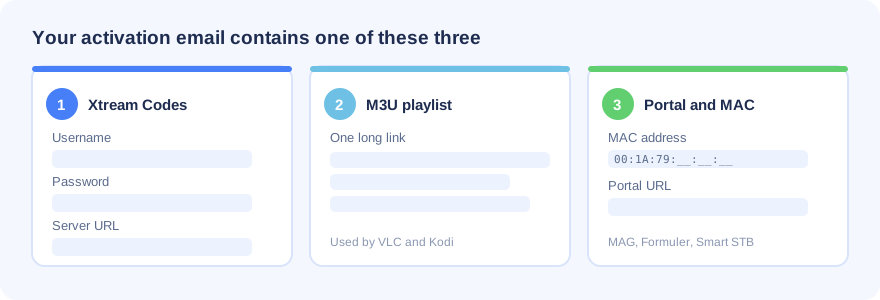
Strong IPTV activation details: Xtream Codes, M3U playlist or portal and MAC address

As soon as your order is confirmed we email your login details. Keep that email open, because every method below uses one of these three formats:

  • Xtream Codes login which is a username, a password and a server URL. This is the easiest option and works in most apps.
  • M3U playlist URL which is one long link. Used by VLC, Kodi and a few smart TV players.
  • Portal URL and MAC address used by MAG boxes, Formuler and Smart STB. Send us the MAC address of your device, we register it, then we send your portal link back.

For smooth playback we recommend at least 15 Mbps for HD and 25 Mbps or more for 4K and 8K. A wired ethernet connection is always steadier than Wi-Fi.

If any step below does not work on your device, message us on WhatsApp or live chat. We will finish the setup for you at no extra cost.

What the login screen looks like
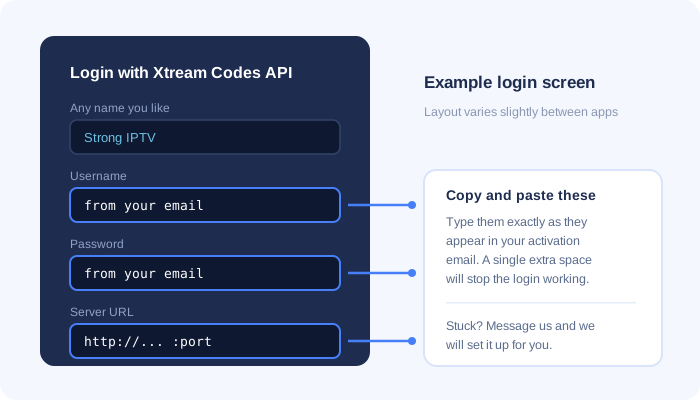
Example Xtream Codes login screen for Strong IPTV
Installing Strong IPTV on a Samsung or LG Smart TV

Samsung runs Tizen and LG runs webOS, so neither can install Android apps. Use one of the players below.

Option 1: Smarters Player Lite (recommended)

  1. Open the app store on your TV, which is Samsung Apps or the LG Content Store.
  2. Search for Smarters Player Lite and install it.
  3. Open the app and choose Login with Xtream Codes API.
  4. Type any profile name you like, then enter the username, password and server URL from your activation email.
  5. Select Add User and wait while your channels, movies and series load.

Option 2: IBO Player

  1. Install IBO Player from your TV app store and open it.
  2. Write down the MAC address and device key shown on the screen.
  3. Send both to us on WhatsApp. We upload your playlist to the player and confirm when it is ready.
  4. Restart the app and your channels will be there.

A few older Samsung and LG models will not run either app. If yours is one of them, use the Smart STB method or plug an Android TV box or Firestick into the TV instead.
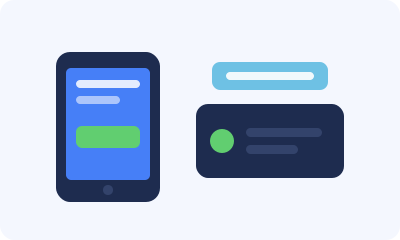
Strong IPTV on Android phone, tablet and TV box
  1. Open the Google Play Store and install IPTV Smarters Pro, XCIPTV or OTT Navigator. Any of the three works well.
  2. Launch the app and select Add User or Add Playlist.
  3. Choose Xtream Codes API as the login type.
  4. Enter a profile name, then your username, password and server URL exactly as they appear in your email. Watch out for extra spaces.
  5. Confirm and wait for the channel list to download.

If you want a cable style channel grid with a full TV guide, TiviMate and OTT Navigator give the best experience on Android TV boxes.

Strong IPTV setup on Amazon Firestick and Fire TV

Easiest method

  1. From the Fire TV home screen open Find and then Search.
  2. Search for IPTV Smarters Pro and install it from the Amazon Appstore.
  3. Open the app, choose Login with Xtream Codes API, then enter your username, password and server URL.

If the app is not offered in your region

  1. Go to Settings, then My Fire TV, then Developer Options.
  2. Turn on Apps from Unknown Sources.
  3. Back on the home screen, search for Downloader and install it.
  4. Contact our support team. We will send you the correct download link for your device. Enter it in Downloader and select Go.
  5. Install the app, open it and sign in with your Xtream Codes details.

Only install player apps from the official Amazon Appstore or from a link our team gives you. Files from unknown sites are often repackaged with unwanted software.

Strong IPTV on iPhone, iPad and Apple TV
  1. Open the App Store and install Smarters Player Lite.
  2. Open the app and accept the terms of use.
  3. Select Login with Xtream Codes API.
  4. Enter a profile name plus the username, password and server URL from your activation email.
  5. Select Add User to load your channels.

Apple TV owners can install the same app from the tvOS App Store. iOS 12 or newer is required.

Strong IPTV on Windows PC and Mac

Option 1: VLC Media Player

  1. Download VLC from videolan.org and install it.
  2. On Windows open Media and then Open Network Stream. On Mac open File and then Open Network.
  3. Paste the M3U playlist URL from your activation email.
  4. Select Play, wait for the list to load, then open View and Playlist to browse channels.

VLC plays the streams but does not show categories or the TV guide.

Option 2: IPTV Smarters Pro for desktop

Download the Windows or macOS build from the official IPTV Smarters website, install it, then sign in with your Xtream Codes username, password and server URL. This version gives you categories, the TV guide and the full video on demand library.
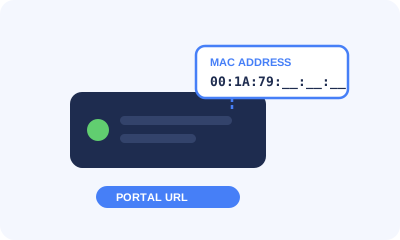
MAG box MAC address and portal URL setup for Strong IPTV
  1. Go to Settings, then System Settings, then Device Info, and note the MAC address. It looks similar to 00:1A:79:XX:XX:XX.
  2. Send that MAC address to us on WhatsApp or live chat.
  3. We register it on our server and send your portal URL back to you.
  4. On the box open Settings, then System Settings, then Servers, then Portals.
  5. Type a name into Portal 1 Name and paste the portal URL into Portal 1 URL.
  6. Save and restart the box. Your channels load automatically on the next boot.

Formuler box setup for Strong IPTV

Formuler boxes come with the MyTVOnline player built in.

  1. Open MyTVOnline from the home screen.
  2. Select Add Portal or Add Playlist.
  3. For the portal method, send us the MAC address shown in the box settings and we will reply with your portal URL. For Xtream Codes, pick that option and enter your username, password and server URL.
  4. Save, then reload the portal to pull in your channels and TV guide.

Formuler boxes also run Android, so IPTV Smarters Pro or TiviMate from the Play Store work as an alternative.
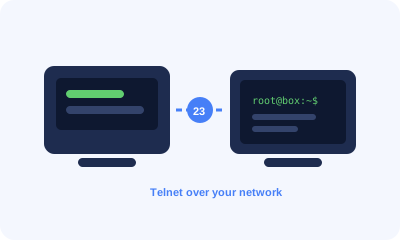
Enigma2 and Dreambox setup for Strong IPTV over telnet

This method uses a Windows computer to send your playlist to the receiver across your home network.

  1. On the receiver go to Menu, then Setup, then System, then Network, then Adapter Settings, and note the IP address. It normally starts with 192.168.
  2. On your computer download PuTTY from the official PuTTY website.
  3. Open PuTTY, enter the IP address from step 1, set the port to 23 and the connection type to Telnet, then select Open.
  4. Log in. Unless you changed it, the username and the password are both root.
  5. Copy the installation line from your activation email, paste it into the window with a right click, then press Enter.
  6. Type reboot and press Enter. Once the receiver restarts you will find a new IPTV bouquet holding all of your channels.
Dreamlink and OpenBox setup for Strong IPTV

Dreamlink T1, T1 Plus, T2 and T6

  1. Let the box finish starting up and complete any firmware update it offers.
  2. When the server menu appears press Exit and confirm with OK. The MAC address is in the top right corner of the main screen.
  3. Send us that MAC address so we can register it and issue your portal URL.
  4. Open Settings and press the green button on the remote to reach the edit screen.
  5. Enter Strong IPTV as the portal name and paste in your portal URL.
  6. Confirm, restart the box, and start watching.

OpenBox

  1. On a computer, open your M3U playlist URL in a browser and save the file with the name Strong IPTV.
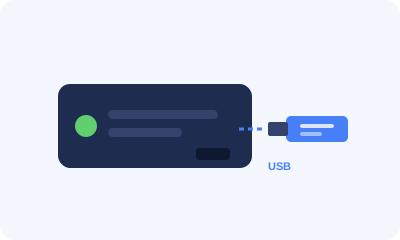
  2. Copy that file onto a USB stick and plug the stick into the back of the OpenBox.
  3. On the remote press Menu, then go to Network Local Settings and then Network App.
  4. Select your playlist, press the yellow button to read it from USB, and wait for the success message.
Strong IPTV on Kodi with PVR IPTV Simple Client
  1. Open Kodi and go to Settings, then Add-ons, then Install from repository.
  2. Choose PVR clients and install PVR IPTV Simple Client.
  3. Open the add-on settings and set the location to Remote path.
  4. Paste your M3U playlist URL into the M3U field. To get the TV guide as well, paste the EPG URL from your email into the EPG field.
  5. Enable the add-on and restart Kodi. Your channels then appear under TV on the main menu.
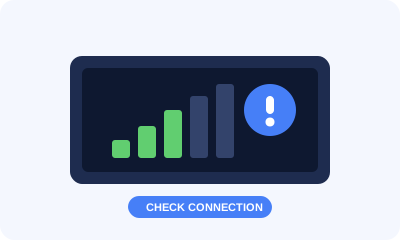
Strong IPTV troubleshooting and connection check

The app says the account is invalid or no channels load

Check the username, password and server URL for typos and stray spaces. Copying and pasting straight from the email avoids most of these mistakes.

Streams freeze or buffer

Restart your device and your router first. Move to an ethernet cable instead of Wi-Fi if you can. If your internet provider slows down streaming traffic, a VPN usually clears it up.

Some channels work and others do not

An individual channel can drop at the source for a short time. Send us the channel name and we will check the feed and fix it.

Picture quality is lower than expected

Test your connection speed first, since 4K and 8K need roughly 25 Mbps held steady. Also check that the player is not set to a lower quality preset.

Still stuck

Contact us on WhatsApp or live chat with your device model and a short description of what you see on screen. Our team is available 24 hours a day and can complete the setup remotely for you.

news-1701

yakinjp

MAUJP

MAUJP

MAUJP

SATGASJITU

SLOT GACOR

SALAMJITU

SATGASJITU

SEMOGAJITU

SALAMJITU

Slot Gacor

MAUJP

Slot Gacor

SLOT GACOR

https://kominfo.belukab.go.id/

https://www.kampunginggris.id/

https://jhpartners.net/

artikel 286666700051

artikel 286666700052

artikel 286666700053

artikel 286666700054

artikel 286666700055

artikel 286666700056

artikel 286666700057

artikel 286666700058

artikel 286666700059

artikel 286666700060

artikel 286666700061

artikel 286666700062

artikel 286666700063

artikel 286666700064

artikel 286666700065

artikel 286666700066

artikel 286666700067

artikel 286666700068

artikel 286666700069

artikel 286666700070

artikel 286666700071

artikel 286666700072

artikel 286666700073

artikel 286666700074

artikel 286666700075

artikel 286666700076

artikel 286666700077

artikel 286666700078

artikel 286666700079

artikel 286666700080

artikel 286666700081

artikel 286666700082

artikel 286666700083

artikel 286666700084

artikel 286666700085

artikel 286666700086

artikel 286666700087

artikel 286666700088

artikel 286666700089

artikel 286666700090

artikel 286666700091

artikel 286666700092

artikel 286666700093

artikel 286666700094

artikel 286666700095

artikel 286666700096

artikel 286666700097

artikel 286666700098

artikel 286666700099

artikel 286666700100

artikel 186666700001

artikel 186666700002

artikel 186666700003

artikel 186666700004

artikel 186666700005

artikel 186666700006

artikel 186666700007

artikel 186666700008

artikel 186666700009

artikel 186666700010

artikel 186666700011

artikel 186666700012

artikel 186666700013

artikel 186666700014

artikel 186666700015

artikel 186666700016

artikel 186666700017

artikel 186666700018

artikel 186666700019

artikel 186666700020

artikel 186666700021

artikel 186666700022

artikel 186666700023

artikel 186666700024

artikel 186666700025

artikel 186666700026

artikel 186666700027

artikel 186666700028

artikel 186666700029

artikel 186666700030

artikel 186666700031

artikel 186666700032

artikel 186666700033

artikel 186666700034

artikel 186666700035

artikel 186666700036

artikel 186666700037

artikel 186666700038

artikel 186666700039

artikel 186666700040

artikel 186666700041

artikel 186666700042

artikel 186666700043

artikel 186666700044

artikel 186666700045

artikel 186666700046

artikel 186666700047

artikel 186666700048

artikel 186666700049

artikel 186666700050

artikel 786996700151

artikel 786996700152

artikel 786996700153

artikel 786996700154

artikel 786996700155

artikel 786996700156

artikel 786996700157

artikel 786996700158

artikel 786996700159

artikel 786996700160

artikel 786996700161

artikel 786996700162

artikel 786996700163

artikel 786996700164

artikel 786996700165

artikel 786996700166

artikel 786996700167

artikel 786996700168

artikel 786996700169

artikel 786996700170

artikel 786996700171

artikel 786996700172

artikel 786996700173

artikel 786996700174

artikel 786996700175

artikel 786996700176

artikel 786996700177

artikel 786996700178

artikel 786996700179

artikel 786996700180

artikel 786996700181

artikel 786996700182

artikel 786996700183

artikel 786996700184

artikel 786996700185

artikel 786996700186

artikel 786996700187

artikel 786996700188

artikel 786996700189

artikel 786996700190

artikel 786996700191

artikel 786996700192

artikel 786996700193

artikel 786996700194

artikel 786996700195

artikel 786996700196

artikel 786996700197

artikel 786996700198

artikel 786996700199

artikel 786996700200

artikel 88666670481

artikel 88666670482

artikel 88666670483

artikel 88666670484

artikel 88666670485

artikel 88666670486

artikel 88666670487

artikel 88666670488

artikel 88666670489

artikel 88666670490

artikel 88666670491

artikel 88666670492

artikel 88666670493

artikel 88666670494

artikel 88666670495

artikel 88666670496

artikel 88666670497

artikel 88666670498

artikel 88666670499

artikel 88666670500

artikel 88666670501

artikel 88666670502

artikel 88666670503

artikel 88666670504

artikel 88666670505

artikel 88666670506

artikel 88666670507

artikel 88666670508

artikel 88666670509

artikel 88666670510

artikel 88666670511

artikel 88666670512

artikel 88666670513

artikel 88666670514

artikel 88666670515

artikel 88666670516

artikel 88666670517

artikel 88666670518

artikel 88666670519

artikel 88666670520

artikel 88666670521

artikel 88666670522

artikel 88666670523

artikel 88666670524

artikel 88666670525

artikel 88666670526

artikel 88666670527

artikel 88666670528

artikel 88666670529

artikel 88666670530

article 58666670486

article 58666670487

article 58666670488

article 58666670489

article 58666670490

article 58666670491

article 58666670492

article 58666670493

article 58666670494

article 58666670495

article 58666670496

article 58666670497

article 58666670498

article 58666670499

article 58666670500

article 58666670501

article 58666670502

article 58666670503

article 58666670504

article 58666670505

article 58666670506

article 58666670507

article 58666670508

article 58666670509

article 58666670510

article 58666670511

article 58666670512

article 58666670513

article 58666670514

article 58666670515

article 58666670516

article 58666670517

article 58666670518

article 58666670519

article 58666670520

article 58666670521

article 58666670522

article 58666670523

article 58666670524

article 58666670525

article 58666670526

article 58666670527

article 58666670528

article 58666670529

article 58666670530

article 58666670531

article 58666670532

article 58666670533

article 58666670534

article 58666670535

artikel 786666700101

artikel 786666700102

artikel 786666700103

artikel 786666700104

artikel 786666700105

artikel 786666700106

artikel 786666700107

artikel 786666700108

artikel 786666700109

artikel 786666700110

artikel 786666700111

artikel 786666700112

artikel 786666700113

artikel 786666700114

artikel 786666700115

artikel 786666700116

artikel 786666700117

artikel 786666700118

artikel 786666700119

artikel 786666700120

artikel 786666700121

artikel 786666700122

artikel 786666700123

artikel 786666700124

artikel 786666700125

artikel 786666700126

artikel 786666700127

artikel 786666700128

artikel 786666700129

artikel 786666700130

artikel 786666700131

artikel 786666700132

artikel 786666700133

artikel 786666700134

artikel 786666700135

artikel 786666700136

artikel 786666700137

artikel 786666700138

artikel 786666700139

artikel 786666700140

artikel 786666700141

artikel 786666700142

artikel 786666700143

artikel 786666700144

artikel 786666700145

artikel 786666700146

artikel 786666700147

artikel 786666700148

artikel 786666700149

artikel 786666700150

news-1701
news-1701

yakinjp

MAUJP

MAUJP

MAUJP

SATGASJITU

SLOT GACOR

SALAMJITU

SATGASJITU

SEMOGAJITU

SALAMJITU

Slot Gacor

MAUJP

Slot Gacor

SLOT GACOR

https://kominfo.belukab.go.id/

https://www.kampunginggris.id/

https://jhpartners.net/

artikel 286666700051

artikel 286666700052

artikel 286666700053

artikel 286666700054

artikel 286666700055

artikel 286666700056

artikel 286666700057

artikel 286666700058

artikel 286666700059

artikel 286666700060

artikel 286666700061

artikel 286666700062

artikel 286666700063

artikel 286666700064

artikel 286666700065

artikel 286666700066

artikel 286666700067

artikel 286666700068

artikel 286666700069

artikel 286666700070

artikel 286666700071

artikel 286666700072

artikel 286666700073

artikel 286666700074

artikel 286666700075

artikel 286666700076

artikel 286666700077

artikel 286666700078

artikel 286666700079

artikel 286666700080

artikel 286666700081

artikel 286666700082

artikel 286666700083

artikel 286666700084

artikel 286666700085

artikel 286666700086

artikel 286666700087

artikel 286666700088

artikel 286666700089

artikel 286666700090

artikel 286666700091

artikel 286666700092

artikel 286666700093

artikel 286666700094

artikel 286666700095

artikel 286666700096

artikel 286666700097

artikel 286666700098

artikel 286666700099

artikel 286666700100

artikel 186666700001

artikel 186666700002

artikel 186666700003

artikel 186666700004

artikel 186666700005

artikel 186666700006

artikel 186666700007

artikel 186666700008

artikel 186666700009

artikel 186666700010

artikel 186666700011

artikel 186666700012

artikel 186666700013

artikel 186666700014

artikel 186666700015

artikel 186666700016

artikel 186666700017

artikel 186666700018

artikel 186666700019

artikel 186666700020

artikel 186666700021

artikel 186666700022

artikel 186666700023

artikel 186666700024

artikel 186666700025

artikel 186666700026

artikel 186666700027

artikel 186666700028

artikel 186666700029

artikel 186666700030

artikel 186666700031

artikel 186666700032

artikel 186666700033

artikel 186666700034

artikel 186666700035

artikel 186666700036

artikel 186666700037

artikel 186666700038

artikel 186666700039

artikel 186666700040

artikel 186666700041

artikel 186666700042

artikel 186666700043

artikel 186666700044

artikel 186666700045

artikel 186666700046

artikel 186666700047

artikel 186666700048

artikel 186666700049

artikel 186666700050

artikel 786996700151

artikel 786996700152

artikel 786996700153

artikel 786996700154

artikel 786996700155

artikel 786996700156

artikel 786996700157

artikel 786996700158

artikel 786996700159

artikel 786996700160

artikel 786996700161

artikel 786996700162

artikel 786996700163

artikel 786996700164

artikel 786996700165

artikel 786996700166

artikel 786996700167

artikel 786996700168

artikel 786996700169

artikel 786996700170

artikel 786996700171

artikel 786996700172

artikel 786996700173

artikel 786996700174

artikel 786996700175

artikel 786996700176

artikel 786996700177

artikel 786996700178

artikel 786996700179

artikel 786996700180

artikel 786996700181

artikel 786996700182

artikel 786996700183

artikel 786996700184

artikel 786996700185

artikel 786996700186

artikel 786996700187

artikel 786996700188

artikel 786996700189

artikel 786996700190

artikel 786996700191

artikel 786996700192

artikel 786996700193

artikel 786996700194

artikel 786996700195

artikel 786996700196

artikel 786996700197

artikel 786996700198

artikel 786996700199

artikel 786996700200

artikel 88666670481

artikel 88666670482

artikel 88666670483

artikel 88666670484

artikel 88666670485

artikel 88666670486

artikel 88666670487

artikel 88666670488

artikel 88666670489

artikel 88666670490

artikel 88666670491

artikel 88666670492

artikel 88666670493

artikel 88666670494

artikel 88666670495

artikel 88666670496

artikel 88666670497

artikel 88666670498

artikel 88666670499

artikel 88666670500

artikel 88666670501

artikel 88666670502

artikel 88666670503

artikel 88666670504

artikel 88666670505

artikel 88666670506

artikel 88666670507

artikel 88666670508

artikel 88666670509

artikel 88666670510

artikel 88666670511

artikel 88666670512

artikel 88666670513

artikel 88666670514

artikel 88666670515

artikel 88666670516

artikel 88666670517

artikel 88666670518

artikel 88666670519

artikel 88666670520

artikel 88666670521

artikel 88666670522

artikel 88666670523

artikel 88666670524

artikel 88666670525

artikel 88666670526

artikel 88666670527

artikel 88666670528

artikel 88666670529

artikel 88666670530

article 58666670486

article 58666670487

article 58666670488

article 58666670489

article 58666670490

article 58666670491

article 58666670492

article 58666670493

article 58666670494

article 58666670495

article 58666670496

article 58666670497

article 58666670498

article 58666670499

article 58666670500

article 58666670501

article 58666670502

article 58666670503

article 58666670504

article 58666670505

article 58666670506

article 58666670507

article 58666670508

article 58666670509

article 58666670510

article 58666670511

article 58666670512

article 58666670513

article 58666670514

article 58666670515

article 58666670516

article 58666670517

article 58666670518

article 58666670519

article 58666670520

article 58666670521

article 58666670522

article 58666670523

article 58666670524

article 58666670525

article 58666670526

article 58666670527

article 58666670528

article 58666670529

article 58666670530

article 58666670531

article 58666670532

article 58666670533

article 58666670534

article 58666670535

artikel 786666700101

artikel 786666700102

artikel 786666700103

artikel 786666700104

artikel 786666700105

artikel 786666700106

artikel 786666700107

artikel 786666700108

artikel 786666700109

artikel 786666700110

artikel 786666700111

artikel 786666700112

artikel 786666700113

artikel 786666700114

artikel 786666700115

artikel 786666700116

artikel 786666700117

artikel 786666700118

artikel 786666700119

artikel 786666700120

artikel 786666700121

artikel 786666700122

artikel 786666700123

artikel 786666700124

artikel 786666700125

artikel 786666700126

artikel 786666700127

artikel 786666700128

artikel 786666700129

artikel 786666700130

artikel 786666700131

artikel 786666700132

artikel 786666700133

artikel 786666700134

artikel 786666700135

artikel 786666700136

artikel 786666700137

artikel 786666700138

artikel 786666700139

artikel 786666700140

artikel 786666700141

artikel 786666700142

artikel 786666700143

artikel 786666700144

artikel 786666700145

artikel 786666700146

artikel 786666700147

artikel 786666700148

artikel 786666700149

artikel 786666700150

news-1701